- Business
- Esoteric
- Fitness & Gym
- Health
- Hypnosis
- Management
- Marketing & Selling
- Massage – SPA
- Parenting
- PUA Seduction
- Science
- Self Improvement
- Art
- Investing
- Painting & Sculpting
- Tai Chi & Martial Arts
- Qigong
- Taoism
- Design & Graphics
- Medicine
- Exams
- Spirituality & Religion
- Hobbies & Fixing & Woodworking
- Photography & Film Making
- Networking & Lan
- Forex & Trading
- IQ & Memory
- Vision & Eye Care
- Swimming & Scuba diving & Water Sports
- Security & Hacking
- Travel
- Cooking
- Driving & Flighting
- Languages
- Computers & Programming
- Building & Home Improvement
- Music
- Astronomy
- History
- Mathematics
- Philosophy
- Literature & Writing
- Economics & Finance
- Sewing
- Hunting
- Electronics
- Psychology & Psychiatry
-75%

Better Freestyle Breathing In 5 Pool Sessions
Original price was: $20.00.$5.00Current price is: $5.00.

BLENDER: How to create and rig the Iron Giant
Original price was: $20.00.$5.00Current price is: $5.00.
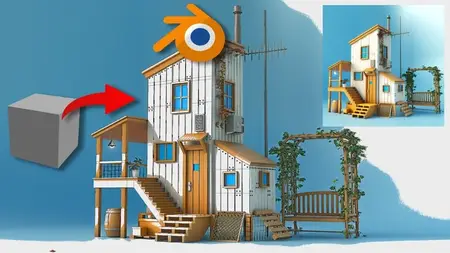
Blender Basics: Complete 3D Beginners Course
Original price was: $20.00.$5.00Current price is: $5.00.
Description
Published 5/2025
Created by VDYA World
MP4 | Video: h264, 1280×720 | Audio: AAC, 44.1 KHz, 2 Ch
Level: Beginner | Genre: eLearning | Language: English | Duration: 18 Lectures ( 1h 56m ) | Size: 2.14 GB
Learn Blender 4 fast—navigate the UI, master extrude / bevel / modifiers & asset browser, then model and render a house
What you’ll learn
Blender setup & navigation – install Blender 4.x, customise the workspace, and move confidently in 3D space
Core modeling tools – master extrude, bevel, inset, and key modifiers to shape any object
Asset Browser workflow – reuse materials, meshes, to speed up production
Camera & lighting fundamentals – frame, move, and light your scene for portfolio-ready renders
Panels, shortcuts & best practices – work faster with industry-standard hotkeys and UI tips
Capstone project – follow along as we transform the default cube into a stylised wooden house, complete with textures, props, and a final render
Requirements
Beginners who have never touched 3D software
No prior 3D experience required—just a computer that meets Blender’s minimum specs and the curiosity to create.
Description
Welcome to this beginner-friendly Blender 3D course! If you’ve never used 3D software before, don’t worry—I’ll walk you through everything step by step. Learn Blender basics in just a few hours and turn a simple cube into a fully–textured 3D house. Whether you’re brand-new to 3D or switching from other software, this hands-on course guides you step by step through Blender’s essential tools—so you can start creating, rendering, and sharing your own models today. By the end of the course, you’ll have all the tools you need to build simple 3D models on your own—and we’ll even create a fun final project together to wrap it up.What you’ll build & learn:Blender setup & navigation – install Blender 4.x, customize the workspace, and move confidently in 3D spaceCore modeling tools – master extrude, bevel, inset, and key modifiers to shape any objectAsset Browser workflow – reuse materials, meshes, to speed up productionCamera & lighting fundamentals – frame, move, and light your scene for portfolio-ready rendersPanels, shortcuts & best practices – work faster with industry-standard hotkeys and UI tipsCapstone project – follow along as we transform the default cube into a stylized wooden house, complete with textures, props, and a final renderWhy learn Blender ?Blender is 100 % free, open-source, and studio-approved, powering hit games, films, and product designs. Solid Blender skills open doors in:Game design & development3D animation & VFXArchitectural visualizationProduct & industrial designXR / Metaverse content creationBy the end of this Complete 3D Beginners Course, you’ll have the confidence to model your own assets, understand Blender’s production workflow, and render eye-catching images for portfolios, games, or client work.Ready to start creating? Click “Enroll Now” and join hands with 3D artists mastering Blender!
Who this course is for
Students aiming to build a job-ready foundation for careers in 3D, games, or film
Designers, architects, & marketers who need quick, high-quality visuals
Hobbyists moving from SketchUp, Maya, or Cinema 4D to Blender
Homepage
https://anonymz.com/?https://www.udemy.com/course/blender-course/
Shipping & Delivery
DIGITAL DELIVERY ONLY
This is digital product THE DOWNLOAD LINK SEND 12-24 HOURS AFTER UPON PURSUASE AND PAYMENT CLEARS"
- The digital files are uploaded on PCLOUD
- 12-24 hours delivery time
- the download links expire after 7 days and need to download them
- to renew the download link after expiration have one additional fee $5 per product
REQUESTS
Also we accept requests and course exchanges
In Course exchanges we are sending credits only
The credits will be the same price as we can sell course
"REFUNDS & RETURNS"
No Refunds on digital product
ONLY EXCHANGE
- Because of the abuse of the refunds from many customers i don't accept refunds
- We accept only 1 time exchange with product of the same price
- if you done mistake on the exchangeable product i don't recognize it as your mistake
- Exchanges only 3 days after the payment of your digital product. (if abused again i will do it 1 day)


