- Business
- Esoteric
- Fitness & Gym
- Health
- Hypnosis
- Management
- Marketing & Selling
- Massage – SPA
- Parenting
- PUA Seduction
- Science
- Self Improvement
- Art
- Investing
- Painting & Sculpting
- Tai Chi & Martial Arts
- Qigong
- Taoism
- Design & Graphics
- Medicine
- Exams
- Spirituality & Religion
- Hobbies & Fixing & Woodworking
- Photography & Film Making
- Networking & Lan
- Forex & Trading
- IQ & Memory
- Vision & Eye Care
- Swimming & Scuba diving & Water Sports
- Security & Hacking
- Travel
- Cooking
- Driving & Flighting
- Languages
- Computers & Programming
- Building & Home Improvement
- Music
- Astronomy
- History
- Mathematics
- Philosophy
- Literature & Writing
- Economics & Finance
- Sewing
- Hunting
- Electronics
- Psychology & Psychiatry


Ansys Fluent Class#2 Let’s do more practice&SettingUpPhysics
$5.00
Description
MP4 | h264, 1280×720 | Lang: English | Audio: aac, 44100 Hz | 2h 27m | 1.40 GB
What you’ll learn
Student will learn how to simulate the engineering model
Requirements
Basic Engineering Knowledge with powerful computer
Description
This course is a perfect fusion of CFD theory and software exposure. This course explicitly focuses on Space Claim,Meshing and part of typical CFD process using simulation tools Ansys Fluent.
Ansys Space Claim= Doing practice with using Workshop model and Students will learn how to launch the Space Claim Direct Modeler,importing geometry, Exploring/familiarize the Ribbon Toolbars,Structural Tree.
Objectives
To start SpaceClaim in standalone mode and from Workbench
To become acquainted with geometry creation basics
To become acquainted with the structure tree
To import geometry within current component and as a new component
It starts by creating sketches using the Sketch Creation Tools
The Pull Tool is than used to create 3D geometry from the sketch
Ansys Meshing = Doing practice with using Workshop model and Student will learn how to launching mesh, genrating a mesh, creating named selections, using inflation, checking mesh quality, saving the project
•Generating a mesh
•Creating Named Selections
•Using Inflation
•Checking mesh quality
•Saving the project
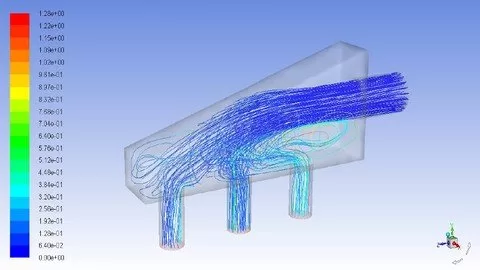
Ansys Fluent= Learning basic steps for CFD Analsys with Ansys Fluent, Launching Ansys Fluent, Fluent Graphic User Interface, using the Ribbons to guide the workflow of the Fluent session, showing the main tabs such as Setting Up domain, check mesh quality, display.Doing more practice with Workshop(Air Monifold) model section.
Setting up Physics
How to define material properties
How to define cell zone conditions in Fluent including solid zones and porous media
The different boundary condition types in Fluent and how to use them
How to specify well-posed boundary conditions
Porous Zone
Workshop:
Simplify the Model
Create a Mesh
Defining Physical Model such as Turbulance and Energy
Selecting Material Property
Defining Boundary Conditions
Setting up solution monitors
Running the simulation
Post Processing
Who this course is for:
Engineers,Designers,Engineering Students(Undergrad and/or Master and/or PHD), Programmers, Consulted, Research Department
HOMEPAGE
Reviews (0)
Only logged in customers who have purchased this product may leave a review.
Shipping & Delivery
DIGITAL DELIVERY ONLY
This is digital product THE DOWNLOAD LINK SEND 12-24 HOURS AFTER UPON PURSUASE AND PAYMENT CLEARS"
- The digital files are uploaded on PCLOUD
- 12-24 hours delivery time
- the download links expire after 7 days and need to download them
- to renew the download link after expiration have one additional fee $5 per product
REQUESTS
Also we accept requests and course exchanges
In Course exchanges we are sending credits only
The credits will be the same price as we can sell course
"REFUNDS & RETURNS"
No Refunds on digital product
ONLY EXCHANGE
- Because of the abuse of the refunds from many customers i don't accept refunds
- We accept only 1 time exchange with product of the same price
- if you done mistake on the exchangeable product i don't recognize it as your mistake
- Exchanges only 3 days after the payment of your digital product. (if abused again i will do it 1 day)


Reviews
There are no reviews yet.