- Business
- Esoteric
- Fitness & Gym
- Health
- Hypnosis
- Management
- Marketing & Selling
- Massage – SPA
- Parenting
- PUA Seduction
- Science
- Self Improvement
- Art
- Investing
- Painting & Sculpting
- Tai Chi & Martial Arts
- Qigong
- Taoism
- Design & Graphics
- Medicine
- Exams
- Spirituality & Religion
- Hobbies & Fixing & Woodworking
- Photography & Film Making
- Networking & Lan
- Forex & Trading
- IQ & Memory
- Vision & Eye Care
- Swimming & Scuba diving & Water Sports
- Security & Hacking
- Travel
- Cooking
- Driving & Flighting
- Languages
- Computers & Programming
- Building & Home Improvement
- Music
- Astronomy
- History
- Mathematics
- Philosophy
- Literature & Writing
- Economics & Finance
- Sewing
- Hunting
- Electronics
- Psychology & Psychiatry
-75%
Back to products


Affiliate Marketing Success For Busy Entrepreneurs
Original price was: $20.00.$5.00Current price is: $5.00.
3D Scan Integration Techniques
Original price was: $20.00.$5.00Current price is: $5.00.
Description
MP4 | Video: h264, yuv420p, 1920×1080 | Audio: aac, 44100 Hz | Duration: 5h 47m | 1.87 GB
Genre: eLearning | Language: English
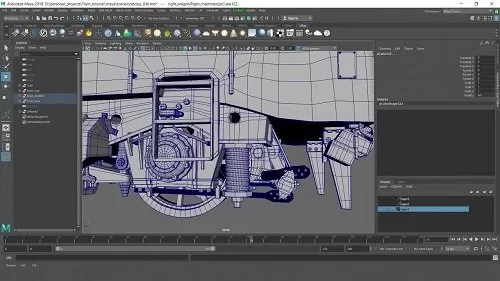
Adrian Vallecilla’s 5-hour workshop details a complete workflow for integrating hero assets into backplates with photorealistic results. Using a classic technique in visual effects production, Adrien reveals how to transform a 3D scan of a train into a production-ready asset using Maya, discussing the important hard-surface modeling theories while demonstrating the process. The texturing portion includes how to clean up textures from the 3D scan and project them back onto a clean 3D asset using Mari — a standard practice that ensures the CG asset is usable in VFX production.
Back in Maya, the look-dev, lighting, and rendering is handled with V-Ray. Adrien discusses the importance of matching the lighting of the plate with the 3D asset being integrated for truly realistic results and demonstrates how to recreate the correct lighting scenario. Using Maya’s render setup tools, Adrien shows how to export all the necessary lighting passes required for professional compositing in Nuke. As well as detailing the process, he also discusses what to look out for when creating realistic CG integrations using Nuke.
HOMEPAGE
https://www.thegnomonworkshop.com/tutorials/3d-scan-integration-techniques
Reviews (0)
Only logged in customers who have purchased this product may leave a review.
Shipping & Delivery
DIGITAL DELIVERY ONLY
This is digital product THE DOWNLOAD LINK SEND 12-24 HOURS AFTER UPON PURSUASE AND PAYMENT CLEARS"
- The digital files are uploaded on PCLOUD
- 12-24 hours delivery time
- the download links expire after 7 days and need to download them
- to renew the download link after expiration have one additional fee $5 per product
REQUESTS
Also we accept requests and course exchanges
In Course exchanges we are sending credits only
The credits will be the same price as we can sell course
"REFUNDS & RETURNS"
No Refunds on digital product
ONLY EXCHANGE
- Because of the abuse of the refunds from many customers i don't accept refunds
- We accept only 1 time exchange with product of the same price
- if you done mistake on the exchangeable product i don't recognize it as your mistake
- Exchanges only 3 days after the payment of your digital product. (if abused again i will do it 1 day)


Reviews
There are no reviews yet.