- Business
- Esoteric
- Fitness & Gym
- Health
- Hypnosis
- Management
- Marketing & Selling
- Massage – SPA
- Parenting
- PUA Seduction
- Science
- Self Improvement
- Art
- Investing
- Painting & Sculpting
- Tai Chi & Martial Arts
- Qigong
- Taoism
- Design & Graphics
- Medicine
- Exams
- Spirituality & Religion
- Hobbies & Fixing & Woodworking
- Photography & Film Making
- Networking & Lan
- Forex & Trading
- IQ & Memory
- Vision & Eye Care
- Swimming & Scuba diving & Water Sports
- Security & Hacking
- Travel
- Cooking
- Driving & Flighting
- Languages
- Computers & Programming
- Building & Home Improvement
- Music
- Astronomy
- History
- Mathematics
- Philosophy
- Literature & Writing
- Economics & Finance
- Sewing
- Hunting
- Electronics
- Psychology & Psychiatry
-75%

Computational Multi-Epitope Vaccine Design
Original price was: $20.00.$5.00Current price is: $5.00.
Data Analysis with SPSS using menu bar and SPSS Syntax
Original price was: $20.00.$5.00Current price is: $5.00.
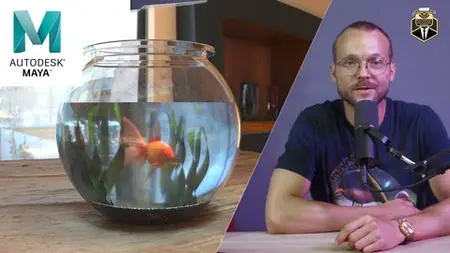
Create A Stylized 3D Fishbowl -Modeling, Shading & Rendering
Original price was: $20.00.$5.00Current price is: $5.00.
Description
Published 8/2025
MP4 | Video: h264, 1920×1080 | Audio: AAC, 44.1 KHz
Language: English | Size: 1.85 GB | Duration: 0h 58m
Learn to model, texture, and render a fishbowl from scratch using professional 3D techniques with Autodesk Maya.
What you’ll learn
Model a stylized fishbowl
Apply textures and materials effectively
Use shading to enhance realism or style
Set up a basic 3D scene with lighting
Render with a focus on clean presentation
Source and prepare stock assets
Requirements
Basic knowledge of 3D modeling software
Installed version of Maya (2022 or newer)
Optional: free Adobe Stock Account / free model sources for fishbowl & fish model
A computer capable of rendering 3D scenes with Arnold renderer
Description
In this hands-on 3D tutorial, you’ll learn how to create a fully textured and shaded fishbowl scene from scratch. The course walks you step by step through the entire creative process, from sourcing and preparing 3D models to applying materials and setting up lighting for a polished final render. Whether you’re using Blender, Maya, or any comparable 3D software, the techniques shown are adaptable and grounded in industry-standard workflows.We’ll begin by selecting or downloading freely available stock assets and importing them into the scene. You’ll learn how to adjust and clean up geometry, model missing elements like water, and set up a simple base. Next, we’ll unwrap UVs and apply textures in a clean, efficient way. You’ll explore shading basics and learn how to give your objects surface detail and realism (or stylization, depending on your goal). Finally, we’ll light and render the scene for presentation.This course is ideal for aspiring 3D artists, designers, students, and hobbyists who want to strengthen their understanding of asset integration, shading logic, and creative scene-building. Basic familiarity with your chosen 3D software is recommended but not required.By the end of this course, you’ll have created a stylized 3D fishbowl scene that’s portfolio-ready and demonstrates your skills in modeling, shading, and visual storytelling.
Overview
Section 1: Introduction
Lecture 1 Introduction
Lecture 2 Scene Setup & Import
Lecture 3 Water
Lecture 4 First Renders
Lecture 5 Intermediate Results
Lecture 6 Ground
Lecture 7 Water Plants
Lecture 8 Texture your Plants
Lecture 9 Fish shader & transparency
Lecture 10 ground plane
Lecture 11 bubbles
Lecture 12 shading adjustments
Lecture 13 castle – modeling basics
Lecture 14 castle
Lecture 15 texture castle
Lecture 16 camera angle
Beginner to intermediate 3D artists .,Anyone interested in building stylized props,Hobbyists and students of digital art,Users familiar with Maya, or similar tools
Homepage
https://anonymz.com/?https://www.udemy.com/course/fishbowl/
Shipping & Delivery
DIGITAL DELIVERY ONLY
This is digital product THE DOWNLOAD LINK SEND 12-24 HOURS AFTER UPON PURSUASE AND PAYMENT CLEARS"
- The digital files are uploaded on PCLOUD
- 12-24 hours delivery time
- the download links expire after 7 days and need to download them
- to renew the download link after expiration have one additional fee $5 per product
REQUESTS
Also we accept requests and course exchanges
In Course exchanges we are sending credits only
The credits will be the same price as we can sell course
"REFUNDS & RETURNS"
No Refunds on digital product
ONLY EXCHANGE
- Because of the abuse of the refunds from many customers i don't accept refunds
- We accept only 1 time exchange with product of the same price
- if you done mistake on the exchangeable product i don't recognize it as your mistake
- Exchanges only 3 days after the payment of your digital product. (if abused again i will do it 1 day)


