- Business
- Esoteric
- Fitness & Gym
- Health
- Hypnosis
- Management
- Marketing & Selling
- Massage – SPA
- Parenting
- PUA Seduction
- Science
- Self Improvement
- Art
- Investing
- Painting & Sculpting
- Tai Chi & Martial Arts
- Qigong
- Taoism
- Design & Graphics
- Medicine
- Exams
- Spirituality & Religion
- Hobbies & Fixing & Woodworking
- Photography & Film Making
- Networking & Lan
- Forex & Trading
- IQ & Memory
- Vision & Eye Care
- Swimming & Scuba diving & Water Sports
- Security & Hacking
- Travel
- Cooking
- Driving & Flighting
- Languages
- Computers & Programming
- Building & Home Improvement
- Music
- Astronomy
- History
- Mathematics
- Philosophy
- Literature & Writing
- Economics & Finance
- Sewing
- Hunting
- Electronics
- Psychology & Psychiatry
-75%

Cymatics - The Art of Music Production
Original price was: $100.00.$10.00Current price is: $10.00.

eMAG Marketplace From Zero to Sales: Listings, SEO & Ads
Original price was: $20.00.$5.00Current price is: $5.00.
Design a Residential and Commercial Solar Design in SketchUp
Original price was: $20.00.$5.00Current price is: $5.00.
Description
Published 2/2026
MP4 | Video: h264, 1920×1080 | Audio: AAC, 44.1 KHz, 2 Ch
Language: English | Duration: 1h 31m | Size: 2.45 GB
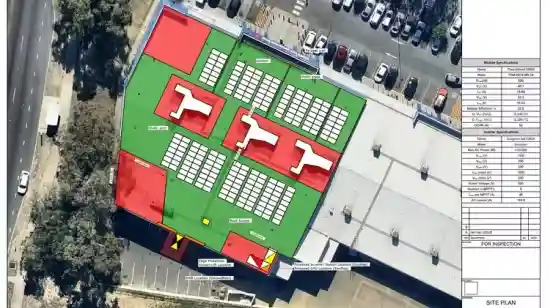
Design a Residential and Commercial Solar Design in SketchUp: Site Plan, Stringing Schematic, Single Line Diagram.
What you’ll learn
How to create a step by step professional commercial PV solar site plan using Sketch Up Draw a 3D Commercial Building in SketchUp, with realistic surroundings.
How to do stringing schematic plan, determine how many panels per string, how many string per MPPTs, etc.
You will learn how to create professional inverter detail plan used in a professional commercial PV design in the industry.
Create comprehensive Single Line Diagram and how to integrate it to the building electrical plan.
Layout a large rooftop solar system in SketchUp & perform Solar Shading Analysis
Import images from NearMap and Google
Requirements
Existing knowledge of Grid-Connected PV Systems. It is possible to complete this course without a SketchUp license. However, we highly recommend that students have access to the SketchUp Pro or Studio full license or trial version.
Description
This course is a practical, step-by-step guide to residential and commercial solar PV system design using SketchUp. It focuses on how solar systems are actually modeled, drafted, and presented for real projects—not theory and not sales talk.
You’ll learn how to create accurate site plans and 3D solar layouts in SketchUp, then convert those models into clear, professional solar drawings. The course covers the full workflow, including stringing schematics, single line diagrams (SLDs), inverter details, and disconnection point plans.
The emphasis is on clarity, accuracy, and industry-style presentation. You’ll understand not just how to draw these plans, but why each drawing exists, what information it must show, and how to keep it readable for installers, engineers, and utilities.
By the end of the course, you’ll be able to
• Model residential and commercial solar PV systems in SketchUp
• Produce clean site plans and PV array layouts
• Create stringing schematics based on proper inverter and MPPT logic
• Draft single line diagrams (SLDs) that clearly show system power flow
• Prepare inverter detail drawings and disconnection point plans
• Present everything as professional, submission-ready drawings
This course is designed for solar designers, drafters, engineers, electricians, and freelancers who want job-ready solar design skills using SketchUp.
If your goal is to create clear, professional solar drawings for residential or commercial projects, this course gives you the exact workflow to do it.
Who this course is for
Solar designers and Installers wanting to expand their business to commercial scale
PV Engineers wanting to upskill to get a higher paying job
Homepage
https://www.udemy.com/course/design-a-residential-and-commercial-solar-design-in-sketchup
Shipping & Delivery
DIGITAL DELIVERY ONLY
This is digital product THE DOWNLOAD LINK SEND 12-24 HOURS AFTER UPON PURSUASE AND PAYMENT CLEARS"
- The digital files are uploaded on PCLOUD
- 12-24 hours delivery time
- the download links expire after 7 days and need to download them
- to renew the download link after expiration have one additional fee $5 per product
REQUESTS
Also we accept requests and course exchanges
In Course exchanges we are sending credits only
The credits will be the same price as we can sell course
"REFUNDS & RETURNS"
No Refunds on digital product
ONLY EXCHANGE
- Because of the abuse of the refunds from many customers i don't accept refunds
- We accept only 1 time exchange with product of the same price
- if you done mistake on the exchangeable product i don't recognize it as your mistake
- Exchanges only 3 days after the payment of your digital product. (if abused again i will do it 1 day)


