- Business
- Esoteric
- Fitness & Gym
- Health
- Hypnosis
- Management
- Marketing & Selling
- Massage – SPA
- Parenting
- PUA Seduction
- Science
- Self Improvement
- Art
- Investing
- Painting & Sculpting
- Tai Chi & Martial Arts
- Qigong
- Taoism
- Design & Graphics
- Medicine
- Exams
- Spirituality & Religion
- Hobbies & Fixing & Woodworking
- Photography & Film Making
- Networking & Lan
- Forex & Trading
- IQ & Memory
- Vision & Eye Care
- Swimming & Scuba diving & Water Sports
- Security & Hacking
- Travel
- Cooking
- Driving & Flighting
- Languages
- Computers & Programming
- Building & Home Improvement
- Music
- Astronomy
- History
- Mathematics
- Philosophy
- Literature & Writing
- Economics & Finance
- Sewing
- Hunting
- Electronics
- Psychology & Psychiatry
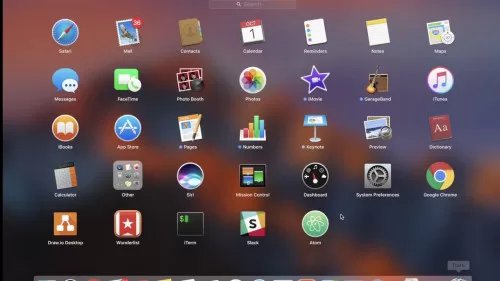

How to Setup macOS for Web Design
$5.00
Description
Duration: 1h 21m | Video: .MP4 1280×720, 30 fps(r) | Audio: AAC, 44100Hz, 2ch | Size: 580 MB
Genre: eLearning | Language: English
Genre: eLearning | Language: English
In this class I will show you how to setup your Mac computer for web design by going through the apps I use almost daily. They’ve made a significant difference in the way I work and I believe it will be the same for you.
In this class you will learn:
What design software you should use
How to pick colors from anywhere on the screen and create color palettes
How to organize your fonts and icons so they’re just one click away
How to measure and distance or dimension from anywhere on your screen
How to take great screenshots and share them with your team or clients
By applying what you learn in this class you will design faster and more efficiently. I’m a strong believer in always using the right tool for the job so that’s why the apps I’m about to show have been used and tested and I can highly recommend them to you.
Now, this class is fantastic for beginners because you’ll benefit from my years of trial and error and you will get a head start in your web design journey. If you’re a more seasoned professional, you might find some cool apps you had no idea about so definitely check out the class.
If you have any questions, just leave a comment in the Discussions section of this class and I’ll do my best to help you out.
So let’s get started – see you in class!
Reviews (0)
Only logged in customers who have purchased this product may leave a review.
Shipping & Delivery
DIGITAL DELIVERY ONLY
This is digital product THE DOWNLOAD LINK SEND 12-24 HOURS AFTER UPON PURSUASE AND PAYMENT CLEARS"
- The digital files are uploaded on PCLOUD
- 12-24 hours delivery time
- the download links expire after 7 days and need to download them
- to renew the download link after expiration have one additional fee $5 per product
REQUESTS
Also we accept requests and course exchanges
In Course exchanges we are sending credits only
The credits will be the same price as we can sell course
"REFUNDS & RETURNS"
No Refunds on digital product
ONLY EXCHANGE
- Because of the abuse of the refunds from many customers i don't accept refunds
- We accept only 1 time exchange with product of the same price
- if you done mistake on the exchangeable product i don't recognize it as your mistake
- Exchanges only 3 days after the payment of your digital product. (if abused again i will do it 1 day)


Reviews
There are no reviews yet.