- Business
- Esoteric
- Fitness & Gym
- Health
- Hypnosis
- Management
- Marketing & Selling
- Massage – SPA
- Parenting
- PUA Seduction
- Science
- Self Improvement
- Art
- Investing
- Painting & Sculpting
- Tai Chi & Martial Arts
- Qigong
- Taoism
- Design & Graphics
- Medicine
- Exams
- Spirituality & Religion
- Hobbies & Fixing & Woodworking
- Photography & Film Making
- Networking & Lan
- Forex & Trading
- IQ & Memory
- Vision & Eye Care
- Swimming & Scuba diving & Water Sports
- Security & Hacking
- Travel
- Cooking
- Driving & Flighting
- Languages
- Computers & Programming
- Building & Home Improvement
- Music
- Astronomy
- History
- Mathematics
- Philosophy
- Literature & Writing
- Economics & Finance
- Sewing
- Hunting
- Electronics
- Psychology & Psychiatry
-75%

Learn the Absolute basics of Flutterflow
Original price was: $20.00.$5.00Current price is: $5.00.

Master Technical Analysis: Crypto, Forex & Indicators
Original price was: $20.00.$5.00Current price is: $5.00.
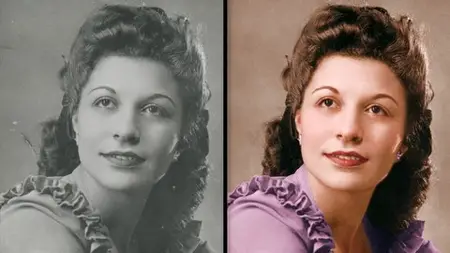
Master Photo Restoration In Affinity Photo
Original price was: $20.00.$5.00Current price is: $5.00.
Description
Published 6/2025
MP4 | Video: h264, 1920×1080 | Audio: AAC, 44.1 KHz
Language: English | Size: 4.28 GB | Duration: 5h 1m
Bring your old photos back to life!
What you’ll learn
You will learn how to restore old images in Affinity Photo
You will learn how to repair worn down photos that have tears & scratches
You will learn how to fix photos that have become discolored
You will learn how to add color to black & whites images
You will learn how to enhance old color photos
Requirements
A copy of Affinity Photo
No prior knowledge or experience of Affinity Photo is required
Description
Welcome to your Photo Restoration Masterclass! In this course, you’ll learn everything you need to restore old photos.We’ll start by preparing your photos—scanning them onto your computer, cropping, and straightening.Next, we’ll move on to cleanup. Using the Inpainting Brush and Clone Brush, you’ll learn how to easily repair tears and scratches that have accumulated over time.Once cleanup is done, we’ll focus on lighting. Old photos often become dull and faded, so I’ll show you multiple techniques to improve the lighting and restore contrast.After lighting, we’ll tackle color. We’ll begin with basic color correction, then move on to fixing more challenging color issues.We’ll also cover small but important details, like reducing noise and removing unwanted textures from your photos.Then comes one of my favorite parts of photo restoration: recoloring! You’ll learn how to add color to black and white images to make them truly come alive.Finally, we’ll wrap up with several practice projects. These will help you reinforce everything you’ve learned throughout the course.This course comes with all the example images that are shown in the videos. That way, you can easily follow along with the tutorials. By the time you finish this course, you’ll be ready to bring all your old photos back to life! 🙂
Overview
Section 1: Course Introduction
Lecture 1 Welcome!
Lecture 2 Download the Exercise Files
Section 2: Prepare & Crop
Lecture 3 Preparing Your Photos
Lecture 4 Cropping
Lecture 5 Straightening
Lecture 6 Fixing Perspective
Section 3: Clean Up
Lecture 7 Clean Up Advice
Lecture 8 Inpainting
Lecture 9 Cloning
Lecture 10 Painting
Lecture 11 Practice 1
Lecture 12 Practice 2
Section 4: Lighting
Lecture 13 Curves Overview
Lecture 14 Masking Adjustments
Lecture 15 Masked Curves
Lecture 16 Masking With Flow
Lecture 17 Gradient Masks
Lecture 18 Lighting Trick
Section 5: Color Correction
Lecture 19 Super Simple Color Correction
Lecture 20 Advanced Color Correction
Lecture 21 Gradient Map Presets
Lecture 22 Matching the Original Colors
Lecture 23 Why Can’t I Add Color?
Section 6: Noise & Sharpening
Lecture 24 Denoising
Lecture 25 Masking Noise
Lecture 26 Dust & Scratches
Lecture 27 Reducing Textures
Lecture 28 Sharpening
Section 7: Let’s Practice!
Lecture 29 Make a Plan
Lecture 30 Clean Up
Lecture 31 Lighting
Lecture 32 Color
Lecture 33 Noise
Lecture 34 Example 2 – Make a Plan
Lecture 35 Example 2 – Clean Up
Lecture 36 Example 2 – Lighting
Lecture 37 Example 2 – Color
Lecture 38 Example 2 – Noise
Section 8: Colorizing Photos
Lecture 39 Make a Plan
Lecture 40 Using a Reference Image
Lecture 41 Gradient Map
Lecture 42 Skin Refinements
Lecture 43 Face Details
Lecture 44 Hair
Lecture 45 Clothes
Lecture 46 Background
Lecture 47 Final Enhancements
Lecture 48 Example 2 – Make a Plan
Lecture 49 Example 2 – Using a Reference Image
Lecture 50 Example 2 – Skin
Lecture 51 Example 2 – Face Details
Lecture 52 Example 2 – Hair
Lecture 53 Example 2 – Clothes
Lecture 54 Example 2 – Final Enhancements
Section 9: Restoring Color Photos
Lecture 55 Red Eye Removal
Lecture 56 Fixing Color Tint
Lecture 57 Make a Plan
Lecture 58 Cropping & Clean Up
Lecture 59 Lighting
Lecture 60 Global Colors
Lecture 61 Targeted Colors
Lecture 62 Adding New Colors
Lecture 63 Noise
Lecture 64 Practice 1 – Clean Up & Lighting
Lecture 65 Practice 1 – Colors & Finishing Touches
Lecture 66 Practice 2 – Clean Up & Lighting
Lecture 67 Practice 2 – Colors & Finishing Touches
Lecture 68 Conclusion
This course is for anyone that wants to use Affinity Photo to restore old photos.
Homepage
https://anonymz.com/?https://www.udemy.com/course/master-photo-restoration-in-affinity-photo/
Shipping & Delivery
DIGITAL DELIVERY ONLY
This is digital product THE DOWNLOAD LINK SEND 12-24 HOURS AFTER UPON PURSUASE AND PAYMENT CLEARS"
- The digital files are uploaded on PCLOUD
- 12-24 hours delivery time
- the download links expire after 7 days and need to download them
- to renew the download link after expiration have one additional fee $5 per product
REQUESTS
Also we accept requests and course exchanges
In Course exchanges we are sending credits only
The credits will be the same price as we can sell course
"REFUNDS & RETURNS"
No Refunds on digital product
ONLY EXCHANGE
- Because of the abuse of the refunds from many customers i don't accept refunds
- We accept only 1 time exchange with product of the same price
- if you done mistake on the exchangeable product i don't recognize it as your mistake
- Exchanges only 3 days after the payment of your digital product. (if abused again i will do it 1 day)


