- Business
- Esoteric
- Fitness & Gym
- Health
- Hypnosis
- Management
- Marketing & Selling
- Massage – SPA
- Parenting
- PUA Seduction
- Science
- Self Improvement
- Art
- Investing
- Painting & Sculpting
- Tai Chi & Martial Arts
- Qigong
- Taoism
- Design & Graphics
- Medicine
- Exams
- Spirituality & Religion
- Hobbies & Fixing & Woodworking
- Photography & Film Making
- Networking & Lan
- Forex & Trading
- IQ & Memory
- Vision & Eye Care
- Swimming & Scuba diving & Water Sports
- Security & Hacking
- Travel
- Cooking
- Driving & Flighting
- Languages
- Computers & Programming
- Building & Home Improvement
- Music
- Astronomy
- History
- Mathematics
- Philosophy
- Literature & Writing
- Economics & Finance
- Sewing
- Hunting
- Electronics
- Psychology & Psychiatry
-75%

Mastering Australian Payroll Management
Original price was: $20.00.$5.00Current price is: $5.00.

Microsoft 365 Copilot (Free Version) Masterclass
Original price was: $20.00.$5.00Current price is: $5.00.
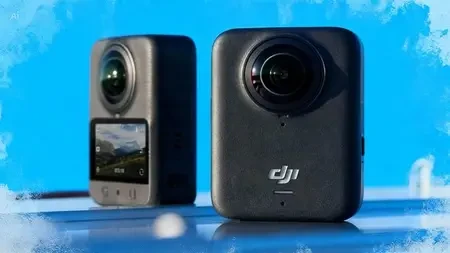
Mastering DJI Studio: Comprehensive Course for Video Editing
Original price was: $20.00.$5.00Current price is: $5.00.
Description
Published 1/2026
Created by Andy Wright
MP4 | Video: h264, 1920×1080 | Audio: AAC, 44.1 KHz, 2 Ch
Level: All | Genre: eLearning | Language: English | Duration: 18 Lectures ( 2h 11m ) | Size: 2.22 GB
Harness the power of DJI Studio, a dedicated desktop video editing software from DJI
What you’ll learn
✓ Understand the system requirements and install DJI Studio on your computer.
✓ Import, edit, and export high-quality 360° footage.
✓ Master reframing tools to transform spherical videos into dynamic, standard-format content.
✓ Guide you through the essentials, from setup to advanced editing techniques
Requirements
● No prior editing experience is required, but familiarity with basic computer operations is helpful
Description
Welcome to Mastering DJI Studio: Editing and Reframing for the DJI Osmo 360 Camera – your complete online course designed to transform raw 360° footage into captivating, professional-grade videos!
Launched in 2025, the DJI Osmo 360 is a groundbreaking handheld 360° camera featuring native 8K/30fps panoramic video, 1-inch sensors for exceptional low-light performance, and innovative modes like 4K/120fps Boost Video. It captures immersive spherical content that lets you relive every angle of the action – from adventures and vlogs to creative storytelling. However, the real magic happens in post-production: turning that all-encompassing sphere into dynamic, viewer-friendly flat videos with controlled perspectives, smooth pans, zooms, and subject tracking.
DJI Studio is the powerful free desktop software (available for macOS 11+ and Windows 10+) built specifically for this purpose. It offers an intuitive interface with advanced reframing tools, intelligent AI tracking, keyframe animation, dewarp for natural flattening, precise angle controls (pan, tilt, roll, FOV), colour grading, speed ramping, and seamless export options – including integration with Adobe Premiere Pro via the DJI Reframe plugin (not covered in this course).
Whether you’re a beginner exploring your first Osmo 360 clips or an intermediate creator seeking pro workflows, this course equips you with everything needed to edit efficiently on your computer.
In this structured program, you’ll start with setup (PC requirements and installation), move through core editing features (importing, timeline navigation, keyframes, intelligent tracking, manual dewarp, and the property inspector), and master creative techniques like direction lock, angle adjustments, and animated reframing. By the end, you’ll confidently produce polished videos ready for social media, YouTube, or professional projects.
No prior editing experience is required – just your Osmo 360 footage and enthusiasm! Expect step-by-step instructions, practical tips, keyboard shortcuts, troubleshooting advice, and visual references (including screenshots from the latest 2026 version of DJI Studio v1.0.60+). Let’s unlock the full creative potential of your 360° captures and turn ordinary moments into extraordinary stories.
Who this course is for
■ This online course is designed for beginners and intermediate users who want to harness the power of DJI Studio, a dedicated desktop video editing software from DJI.
Homepage
https://anonymz.com/?https://www.udemy.com/course/mastering-dji-studio-comprehensive-course-for-video-editing/
Shipping & Delivery
DIGITAL DELIVERY ONLY
This is digital product THE DOWNLOAD LINK SEND 12-24 HOURS AFTER UPON PURSUASE AND PAYMENT CLEARS"
- The digital files are uploaded on PCLOUD
- 12-24 hours delivery time
- the download links expire after 7 days and need to download them
- to renew the download link after expiration have one additional fee $5 per product
REQUESTS
Also we accept requests and course exchanges
In Course exchanges we are sending credits only
The credits will be the same price as we can sell course
"REFUNDS & RETURNS"
No Refunds on digital product
ONLY EXCHANGE
- Because of the abuse of the refunds from many customers i don't accept refunds
- We accept only 1 time exchange with product of the same price
- if you done mistake on the exchangeable product i don't recognize it as your mistake
- Exchanges only 3 days after the payment of your digital product. (if abused again i will do it 1 day)


