- Business
- Esoteric
- Fitness & Gym
- Health
- Hypnosis
- Management
- Marketing & Selling
- Massage – SPA
- Parenting
- PUA Seduction
- Science
- Self Improvement
- Art
- Investing
- Painting & Sculpting
- Tai Chi & Martial Arts
- Qigong
- Taoism
- Design & Graphics
- Medicine
- Exams
- Spirituality & Religion
- Hobbies & Fixing & Woodworking
- Photography & Film Making
- Networking & Lan
- Forex & Trading
- IQ & Memory
- Vision & Eye Care
- Swimming & Scuba diving & Water Sports
- Security & Hacking
- Travel
- Cooking
- Driving & Flighting
- Languages
- Computers & Programming
- Building & Home Improvement
- Music
- Astronomy
- History
- Mathematics
- Philosophy
- Literature & Writing
- Economics & Finance
- Sewing
- Hunting
- Electronics
- Psychology & Psychiatry
-75%

Prioritization Techniques For Decision Makers And Leaders
Original price was: $20.00.$5.00Current price is: $5.00.

Project Management: Mastering the Business Side of Projects
Original price was: $20.00.$5.00Current price is: $5.00.
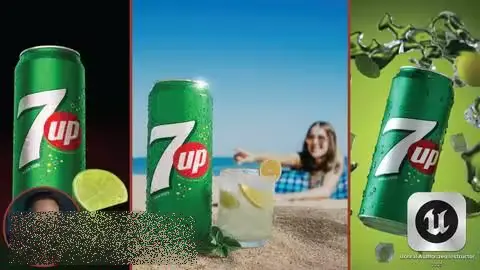
Product Rendering In Unreal Engine 5.6 | Beginner’s Guide
Original price was: $20.00.$5.00Current price is: $5.00.
Description
Published 11/2025
MP4 | Video: h264, 1920×1080 | Audio: AAC, 44.1 KHz
Language: English | Size: 6.45 GB | Duration: 5h 23m
Master lighting, color grading, reference matching & CGI integration with live footage using Unreal & DaVinci Resolve.
What you’ll learn
Build a complete product-rendering workflow in Unreal Engine 5.6, including materials, lighting actors, camera setup, and render settings.
Create professional studio lighting setups in UE5 by studying real photography techniques and accurately replicating them digitally.
Match a product reference image with precision, including camera angle, contrast, hue, saturation, exposure, and overall mood.
Integrate CGI with live-action images, matching perspective, lighting, reflections, and depth of field for realistic compositing.
Use DaVinci Resolve for product-rendering post-production, including color correction, grading, and film-emulation workflows.
Prepare hero assets for rendering by adjusting models/UVs in Maya or Blender and optimizing materials for realistic results.
Develop creative and commercially viable product compositions, focusing on brand colors, message clarity, and visual storytelling.
Create photorealistic droplets and fine details directly in Unreal Engine without simulations or external tools.
Requirements
No advanced experience is required – this course is beginner-friendly and everything is explained step-by-step.
Basic knowledge of any 3D software (Maya, Blender, or similar) is helpful for small model or UV adjustments, but not mandatory.
A Windows PC with an NVIDIA RTX graphics card is recommended, since the course uses ray tracing and path tracing features in Unreal Engine.
Unreal Engine 5.5 or 5.6 installed (free to download).
DaVinci Resolve (Free or Studio version) for post-production and color grading.
Optional: Photoshop for small image prep and texture adjustments.
An interest in product rendering, lighting, and learning professional workflows!
Description
Welcome to the Beginner’s Guide to Product Rendering in Unreal Engine 5.6 and DaVinci Resolve – a complete, beginner-friendly course designed to take you from foundational skills to fully professional, photorealistic product renders.Whether you’re a 3D artist, designer, filmmaker, or complete beginner, this course gives you the full workflow used for product rendering.What This Course Includes15+ hours of content, with 5.5 hours available now and the rest releasing soon.Complete course filesDirect personal support (email + comments)Step-by-step project-based learningSoftware UsedUnreal Engine 5.5 & 5.6DaVinci ResolveMaya (or Blender alternatives)PhotoshopWhat You’ll LearnUnreal Engine FundamentalsNavigation, interface, materials, lighting actors, and camerasReal-time lighting concepts for accurate reflections and brand-consistent renderingHow to replicate real photography lighting setups inside UELighting & Rendering for Product ShotsStudio lighting breakdowns (reflections, fall-offs, diffusion, color control)Building photorealistic hero shots using Marketplace assetsUnderstanding the exposure triangle: F-Stop, Shutter Speed, ISOProfessional render settings for stills and animationsDaVinci Resolve Post-ProductionInterface, media workflow, editing basicsAdvanced color correction and color gradingFilm emulation, contrast shaping, highlight roll-off controlTechniques to match brand colors and reference images accuratelyCGI + Live-Action IntegrationChoosing the right background imagesPrepping live-action plates (with and without Nuke)Matching CGI lighting, shadows, and perspectiveFinal color grading and polish in DaVinci ResolveCourse ProjectsYou will create three complete, professional-level product renders:7UP Case Study 1 – Replicating Real Photography LightingStudy real studio lighting from real world referencesAdjust Marketplace hero assets using Maya/BlenderRecreate a full lighting setup inside UEFinal grade in DaVinci Resolve7UP Case Study 2 – Studio Lighting & Reference MatchingMatch a product reference image preciselyControl hue, saturation, depth, and contrastCreate realistic droplets in UE without simulationsProduce multiple variations using the same setup7UP Case Study 3 – CGI + Live Image IntegrationSelect the right live background imagesPrep plates (files included for non-Nuke users)Integrate CGI model into real photos seamlesslyFinal filmic color grade in DaVinci ResolveRequirementsRTX GPU recommended for ray tracing/path tracingBasic understanding of any 3D software (Maya, Blender, etc.)Photoshop (optional for simple adjustments)Mostly free assets used; optional paid assets only if desiredBy the End of This Course, You Will Be Able To:Build photorealistic product renders from scratchRecreate professional studio lighting setups in Unreal EngineConfidently match real-world reference imagesIntegrate CGI with live-action images convincinglyProduce clean, cinematic final renders using DaVinci Resolve
Beginner to Intermediate 3D Artists who want to learn professional product-rendering workflows without feeling overwhelmed.,Unreal Engine beginners who want to build a strong foundation in lighting, materials, cameras, and cinematic rendering.,Students or self-learners looking to create portfolio-ready product renders and understand real-world commercial workflows.,Artists transitioning from Blender, Maya, V-Ray, Corona, or traditional CGI who want to explore real-time rendering and speed up their production pipeline.,Graphic designers, motion designers, and content creators who want to add high-quality 3D product visuals to their skillset.,Anyone interested in photorealism, lighting, brand-focused color grading, and CGI + live-action integration using Unreal Engine and DaVinci Resolve.
Homepage
https://anonymz.com/?https://www.udemy.com/course/product-rendering-in-unreal-engine-56-beginners-guide/
Shipping & Delivery
DIGITAL DELIVERY ONLY
This is digital product THE DOWNLOAD LINK SEND 12-24 HOURS AFTER UPON PURSUASE AND PAYMENT CLEARS"
- The digital files are uploaded on PCLOUD
- 12-24 hours delivery time
- the download links expire after 7 days and need to download them
- to renew the download link after expiration have one additional fee $5 per product
REQUESTS
Also we accept requests and course exchanges
In Course exchanges we are sending credits only
The credits will be the same price as we can sell course
"REFUNDS & RETURNS"
No Refunds on digital product
ONLY EXCHANGE
- Because of the abuse of the refunds from many customers i don't accept refunds
- We accept only 1 time exchange with product of the same price
- if you done mistake on the exchangeable product i don't recognize it as your mistake
- Exchanges only 3 days after the payment of your digital product. (if abused again i will do it 1 day)


