- Business
- Esoteric
- Fitness & Gym
- Health
- Hypnosis
- Management
- Marketing & Selling
- Massage – SPA
- Parenting
- PUA Seduction
- Science
- Self Improvement
- Art
- Investing
- Painting & Sculpting
- Tai Chi & Martial Arts
- Qigong
- Taoism
- Design & Graphics
- Medicine
- Exams
- Spirituality & Religion
- Hobbies & Fixing & Woodworking
- Photography & Film Making
- Networking & Lan
- Forex & Trading
- IQ & Memory
- Vision & Eye Care
- Swimming & Scuba diving & Water Sports
- Security & Hacking
- Travel
- Cooking
- Driving & Flighting
- Languages
- Computers & Programming
- Building & Home Improvement
- Music
- Astronomy
- History
- Mathematics
- Philosophy
- Literature & Writing
- Economics & Finance
- Sewing
- Hunting
- Electronics
- Psychology & Psychiatry
-75%

Simon Ree - Options Academy Mastery Programs
Original price was: $100.00.$10.00Current price is: $10.00.

The Complete Next.js Testing Course
Original price was: $20.00.$5.00Current price is: $5.00.
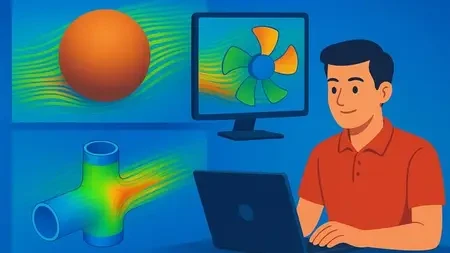
SolidWorks Flow Simulation Mastery: Hands-On Project Course
Original price was: $20.00.$5.00Current price is: $5.00.
Description
Published 12/2025
Created by DR AI
MP4 | Video: h264, 1920×1080 | Audio: AAC, 44.1 KHz, 2 Ch
Level: Beginner | Genre: eLearning | Language: English | Duration: 8 Lectures ( 2h 26m ) | Size: 2.07 GB
Learn CFD Analysis with SolidWorks via Hands-On Projects: External Aerodynamics, Internal Pipe Flows, and Fan Systems.
What you’ll learn
Set up, mesh, solve, and analyze a complete external aerodynamic simulation by modeling and testing a sphere in a virtual wind tunnel.
Complete the simulation setup, apply initial meshing, run the analysis, and access the core results for an external flow wind tunnel study.
Fine-tune the computational mesh to improve the accuracy and reliability of your Flow Simulation results.
Apply the complete simulation workflow to both an internal flow in a pipe junction and a system containing a fan.
Requirements
A working installation of SolidWorks (2018 or newer recommended). The Flow Simulation add-in is required. A trial or student license is sufficient.
Basic familiarity with the SolidWorks interface. You should know how to create sketches, extrusions, and simple parts/assemblies.
A computer that meets SolidWorks’ system requirements, with sufficient RAM (8GB minimum, 16GB recommended) for running simulations.
No prior simulation or CFD experience is required! All concepts will be taught from the ground up through the projects.
Description
This course teaches you how to use SolidWorks Flow Simulation through practical examples. You will learn by doing three case-studies.First, you will analyze a sphere in a wind tunnel. You will create the 3D model, set up the simulation, run the calculation, and view the results. You will also learn how to improve the accuracy of your simulation by adjusting the mesh.Next, you will simulate the flow and pressure inside a pipe junction. This shows you how to set up and solve an internal flow problem.Finally, you will model a system with a rotating fan. This project teaches you how to use engineering databases and model moving parts in a flow.The course show each step clearly. You will learn the complete process from start to finish: creating geometry, setting up the study, meshing, solving, and understanding the results.Who should take this course:Mechanical engineers and studentsProduct designers who use SolidWorksAnyone who needs to simulate fluid flow, pressure drop, or fan performance in their workUsers with basic SolidWorks modeling skillsRequirements:A computer with SolidWorks installed (2018 or newer is best)Basic knowledge of how to make parts and assemblies in SolidWorksNo previous simulation experience is requiredStart learning how to apply Flow Simulation to your own design projects today.
Who this course is for
Mechanical Engineering Students who want to add practical simulation skills to their resume and understand CFD through hands-on projects, not just theory.
Practicing Engineers & Designers using SolidWorks who need to start analyzing fluid flow, pressure drop, or fan performance in their own designs.
CAD Technicians & Drafters looking to upgrade their skill set and move into more analytical roles by mastering the Flow Simulation toolset.
Hobbyists & Makers with SolidWorks access who are curious about simulating aerodynamics or fluid behavior for their personal projects.
Homepage
https://anonymz.com/?https://www.udemy.com/course/solidworks-flow-simulation-mastery-hands-on-project-course/
Shipping & Delivery
DIGITAL DELIVERY ONLY
This is digital product THE DOWNLOAD LINK SEND 12-24 HOURS AFTER UPON PURSUASE AND PAYMENT CLEARS"
- The digital files are uploaded on PCLOUD
- 12-24 hours delivery time
- the download links expire after 7 days and need to download them
- to renew the download link after expiration have one additional fee $5 per product
REQUESTS
Also we accept requests and course exchanges
In Course exchanges we are sending credits only
The credits will be the same price as we can sell course
"REFUNDS & RETURNS"
No Refunds on digital product
ONLY EXCHANGE
- Because of the abuse of the refunds from many customers i don't accept refunds
- We accept only 1 time exchange with product of the same price
- if you done mistake on the exchangeable product i don't recognize it as your mistake
- Exchanges only 3 days after the payment of your digital product. (if abused again i will do it 1 day)


