- Business
- Esoteric
- Fitness & Gym
- Health
- Hypnosis
- Management
- Marketing & Selling
- Massage – SPA
- Parenting
- PUA Seduction
- Science
- Self Improvement
- Art
- Investing
- Painting & Sculpting
- Tai Chi & Martial Arts
- Qigong
- Taoism
- Design & Graphics
- Medicine
- Exams
- Spirituality & Religion
- Hobbies & Fixing & Woodworking
- Photography & Film Making
- Networking & Lan
- Forex & Trading
- IQ & Memory
- Vision & Eye Care
- Swimming & Scuba diving & Water Sports
- Security & Hacking
- Travel
- Cooking
- Driving & Flighting
- Languages
- Computers & Programming
- Building & Home Improvement
- Music
- Astronomy
- History
- Mathematics
- Philosophy
- Literature & Writing
- Economics & Finance
- Sewing
- Hunting
- Electronics
- Psychology & Psychiatry
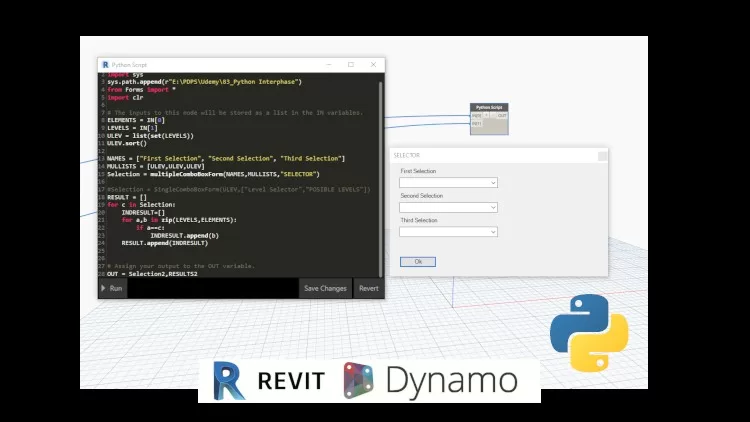


BIM Dynamo Revit Python Programing for User Interphase
$5.00
Description
MP4 | Video: h264, 1280×720 | Audio: AAC, 44.1 KHz, 2 Ch
Genre: eLearning | Language: English | Duration: 18 lectures (1h 36m) | Size: 792 MB
Genre: eLearning | Language: English | Duration: 18 lectures (1h 36m) | Size: 792 MB
Learn how to create Interphases using Python and Windows Forms
What you’ll learn:
Learn how to call an external Python File as a Library and run it from the scripts
Create Windows Forms on the Revit Space for Interaction on the Script Run Abouts
Place Combo Boxes, Radio Buttons, and Labels
Create a revit Selector Tool that can bring Revit Elements from the main Modeling Space
Requirements
Python Language Programing Basics
Dynamo Programing Basic Overview of Nodes and Functions
Revit Modeling Basic Experience for Interphase Creation
BIM Workflows interacting with Models, Requirements, Data and Connections
Description
This course its a great opportunity to improve your dynamo skills, by adding direct windows forms into your scripts.
Either for single selection, comboboxes or radiobuttons you will grasp how to assemble them for your scripts to run directly
We will explore the set about of Combobox, Labels, and Buttons so that they can be called programatically, and by a library read, and will finish the course with the use of revit selector.
This course it oriented to Architects , Engineers and Students with no programming experience so it can facilitate its comprehension and a way of testing and building up their knowledge.
Communication is the core competence required for a fluent BIM Coordination.
Dynamo its amazing as a fast prototyping tool, so that any idea can be achieved in a brefly amount of type, so learning it its a clear advantage and spetially with integration such as Python Windows Forms, and other coding habilities that can close the gap between draft and production of tools. it time to improve our understanding and increase the node functionality to not only optimization but as well all processes related, so join me in to bring all those capabilities to reality and transform your BIM Skills and enjoy at any time the freedom of possibilities to make technology work the way you need it to.
Join to a selective group that its looking for possibilities rather than restrictions, and be UpToDate for all the amazing possibilities that in any time can transform your way of working, to change it forever.
Who this course is for
Programing Architects that need to enable tools for selection or to be usefull on their runtime
BIM Developers new to Dynamo as a drafting tool, and that want to mix capabilities for further production
Engineers that had particular workflows on dynamo and want to share them with other users, or to improve their workflows.
HOMEPAGE
https://anonymz.com/?https://www.udemy.com/course/bdrp_interphase/
Reviews (0)
Only logged in customers who have purchased this product may leave a review.
Shipping & Delivery
DIGITAL DELIVERY ONLY
This is digital product THE DOWNLOAD LINK SEND 12-24 HOURS AFTER UPON PURSUASE AND PAYMENT CLEARS"
- The digital files are uploaded on PCLOUD
- 12-24 hours delivery time
- the download links expire after 7 days and need to download them
- to renew the download link after expiration have one additional fee $5 per product
REQUESTS
Also we accept requests and course exchanges
In Course exchanges we are sending credits only
The credits will be the same price as we can sell course
"REFUNDS & RETURNS"
No Refunds on digital product
ONLY EXCHANGE
- Because of the abuse of the refunds from many customers i don't accept refunds
- We accept only 1 time exchange with product of the same price
- if you done mistake on the exchangeable product i don't recognize it as your mistake
- Exchanges only 3 days after the payment of your digital product. (if abused again i will do it 1 day)


Reviews
There are no reviews yet.