- Business
- Esoteric
- Fitness & Gym
- Health
- Hypnosis
- Management
- Marketing & Selling
- Massage – SPA
- Parenting
- PUA Seduction
- Science
- Self Improvement
- Art
- Investing
- Painting & Sculpting
- Tai Chi & Martial Arts
- Qigong
- Taoism
- Design & Graphics
- Medicine
- Exams
- Spirituality & Religion
- Hobbies & Fixing & Woodworking
- Photography & Film Making
- Networking & Lan
- Forex & Trading
- IQ & Memory
- Vision & Eye Care
- Swimming & Scuba diving & Water Sports
- Security & Hacking
- Travel
- Cooking
- Driving & Flighting
- Languages
- Computers & Programming
- Building & Home Improvement
- Music
- Astronomy
- History
- Mathematics
- Philosophy
- Literature & Writing
- Economics & Finance
- Sewing
- Hunting
- Electronics
- Psychology & Psychiatry
-75%

Responding to Corrective Action Requests
Original price was: $20.00.$5.00Current price is: $5.00.

S&OP & Demand Forecasting for Supply Chain Managers w- Excel
Original price was: $20.00.$5.00Current price is: $5.00.
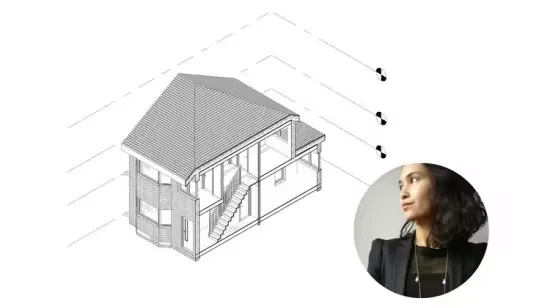
Revit Unlocked: Fundamental Building Blocks for Architects
Original price was: $20.00.$5.00Current price is: $5.00.
Description
Published 2/2026
MP4 | Video: h264, 1920×1080 | Audio: AAC, 44.1 KHz, 2 Ch
Language: English | Duration: 35m | Size: 525 MB
Confidently create 3D architectural models in Revit, extract information from them, and present your work on sheets.
What you’ll learn
Learn through a combination of presentation slides, screenshots, and demonstration videos over four modules.
Navigate the Revit interface from an architecture perspective, and in relation to other drawing software.
Understand key Revit terminology relevant to project setup, and setting up a new project.
Confidently build 3D models, using parameters correctly to set out grids and levels, creating walls, floors, and roofs, and inserting doors and windows.
Generate and manage different view types, including floor plans, sections, elevations, and 3D views.
Set up and configure sheets, including selecting and applying title blocks, and adding key annotations, dimensions, and other documentation elements.
Prepare your project for printing as a complete set of documentation.
There are many more demonstration videos embedded as links in the Lesson PDFs – which are not listed in the Course content below.
Requirements
Basic architecture knowledge. This course is suitable for architecture students and experienced practititioners alike, who are interested in learning to create drawings in 3D rather than 2D.
No prior Revit experience needed. This is a beginner’s course which will take you through the basics in an intuitive way, to set you up for future learning.
Your computer needs to have Revit installed (recommended version 2023 onwards), and at least 8GB of RAM (16GB recommended), a multi-core processor, and a dedicated graphics card.
Autodesk offers a free 30-day trial of Revit, which you can download and use to complete the course.
Description
Important: Download the PDF for each lecture by clicking on the Resources buttons on your Course Content window. As you go through the slides, click on the red text for links to demonstration videos of how to do certain actions. There are MANY (approximately 40) more short demonstration videos included as links in the PDFs compared to the 36 minutes of (uploaded) videos listed in the Overview!
This is a beginners course designed to teach you the basics of using Revit without overcomplicating it. The goal is to teach you just enough now in an intuitive manner, without getting overwhelmed. Use your newfound familiarity with the software to lay a firm foundation for further learning later on.
Learn how to confidently create and manage basic architectural models in Revit including setting up levels and grids, modelling key architectural elements, and presenting your work on sheets ready for printing. Gain the foundational skills needed to participate effectively in a professional architectural environment and continue your learning journey in drawing in 3D.
Taught over four modules with four or five lessons each, you’ll first get familiar with the interface, before starting to build a model in 3D, using CAD reference plans as a template to aid your learning. Then you’ll extract information from the 3D model into different views, and present those views onto sheets, also known as your paper space. You can then add other information such as annotations and dimensions onto these sheets, and eventually print and share them with your client, design team, or contractor.
The teaching material is broken down into
Module 1 – Introduction to Revit and Project Setup
Module 2 – Modelling Basic Architectural Elements
Module 3 – Creating and Customising Views
Module 4 – Presenting Models on Sheets
At the beginning of each Module and Lesson, I’ll give you a short introductory video about what we’ll cover. Download and open up the PDF with slides for that Lesson and follow it through, as each one has been designed to systematically take you through the process. Within the PDFs, you’ll find links to short demonstration videos about one to three minutes long each. For the best learning experience, have Revit open when you’re going through these lessons and just have a play along in the software.
The aim by the end of this course is for you to be comfortable with creating small projects and creating a set of drawing documentation, without the overwhelm!
Who this course is for
An architecture student who is curious to learn the basics of Revit, but is overwhelmed by the perceived complexity of the software.
A recent architecture graduate who wants to learn how to build and present models in Revit to gain a competitive edge in the job market.
A practicing architect looking to upskill from 2D to 3D drawing to improve efficiency, but without having to take days off work.
Homepage
https://www.udemy.com/course/revit-unlocked-fundamental-building-blocks-for-architects
Shipping & Delivery
DIGITAL DELIVERY ONLY
This is digital product THE DOWNLOAD LINK SEND 12-24 HOURS AFTER UPON PURSUASE AND PAYMENT CLEARS"
- The digital files are uploaded on PCLOUD
- 12-24 hours delivery time
- the download links expire after 7 days and need to download them
- to renew the download link after expiration have one additional fee $5 per product
REQUESTS
Also we accept requests and course exchanges
In Course exchanges we are sending credits only
The credits will be the same price as we can sell course
"REFUNDS & RETURNS"
No Refunds on digital product
ONLY EXCHANGE
- Because of the abuse of the refunds from many customers i don't accept refunds
- We accept only 1 time exchange with product of the same price
- if you done mistake on the exchangeable product i don't recognize it as your mistake
- Exchanges only 3 days after the payment of your digital product. (if abused again i will do it 1 day)


