- Business
- Esoteric
- Fitness & Gym
- Health
- Hypnosis
- Management
- Marketing & Selling
- Massage – SPA
- Parenting
- PUA Seduction
- Science
- Self Improvement
- Art
- Investing
- Painting & Sculpting
- Tai Chi & Martial Arts
- Qigong
- Taoism
- Design & Graphics
- Medicine
- Exams
- Spirituality & Religion
- Hobbies & Fixing & Woodworking
- Photography & Film Making
- Networking & Lan
- Forex & Trading
- IQ & Memory
- Vision & Eye Care
- Swimming & Scuba diving & Water Sports
- Security & Hacking
- Travel
- Cooking
- Driving & Flighting
- Languages
- Computers & Programming
- Building & Home Improvement
- Music
- Astronomy
- History
- Mathematics
- Philosophy
- Literature & Writing
- Economics & Finance
- Sewing
- Hunting
- Electronics
- Psychology & Psychiatry
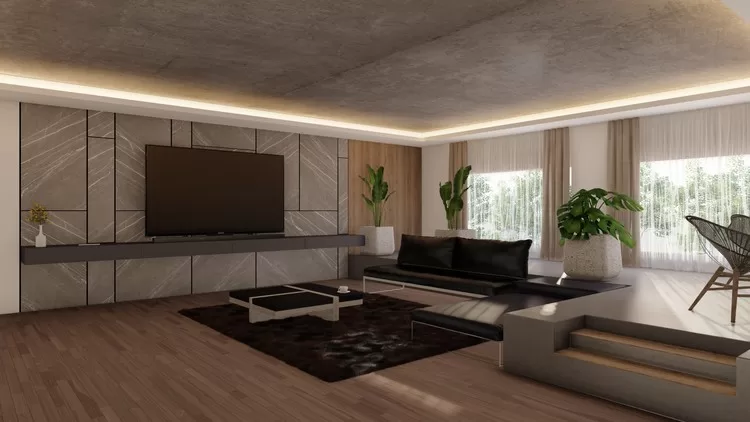


SketchUp Lumion Interior Day Rendering Guide
$5.00
Description
Published 5/2023
Created by Khushal Panchariya
MP4 | Video: h264, 1280×720 | Audio: AAC, 44.1 KHz, 2 Ch
Genre: eLearning | Language: English | Duration: 7 Lectures ( 1h 15m ) | Size: 1.45 GB
Lumion interior day rendering
What you’ll learn
Importing SketchUp Model scenes into Lumion
Editing texture and materials in Lumion
Composing camera angles in Lumion picture Model
Applying realistic settings for photorealistic rendering
Artificial and natural lighting settings
Requirements
Prerequisite knowledge of Lumion Beginners Guide (if new to lumion). Ownership of Lumion software either student(free) or full version(paid).
Description
Hi there, my name is Khushal. This is a lesson on Lumion interior day rendering.This course is for people new to Lumion and 3d rendering. The people who are and also are not familiar with any 3D rendering software or render engines.Learn how to create photo realistic renders in lumion, create scenes, using lumions material and object library, using the photo/camera mode to create renders of your model to achieve maximum photo realism.I hope you find this class helpful, for any further doubts feel free to contact me in the discussion or comments section below the course.Ebook on Architectural Thesis- Click here (Book is completely free is you have a Kindle membership)Join Telegram for Class updates and connect personally for quarries. Click on this to joinThank you for your support.Download the Files required for this class from the ‘Projects and Resources’ panel below.Prerequisite knowledge of Lumion Beginners Guide (if new to lumion)Ownership of Lumion software either student(free) or full version(paid)The “Lumion Interior Day Rendering Guide” is an online course specifically designed to empower architects, interior designers, and 3D visualization enthusiasts in creating stunning and realistic interior renderings using Lumion.In this comprehensive course, you will learn the ins and outs of Lumion’s powerful features and functionalities tailored for interior day renderings. From setting up the lighting and applying materials to optimizing camera angles and enhancing the ambiance, you will gain in-depth knowledge of the tools and techniques required to bring your interior designs to life.Through a combination of step-by-step tutorials, practical exercises, and real-world examples, you will develop the skills to create compelling and immersive interior renderings that showcase the beauty and functionality of your designs. Whether you are a beginner or have some experience with Lumion, this course will take your interior rendering skills to the next level.Join the “Lumion Interior Day Rendering Guide” and unlock your creativity in visualizing interior spaces with breathtaking realism. Impress clients, colleagues, and viewers with your ability to create captivating and photorealistic interior renderings using Lumion’s powerful capabilities.
Who this course is for
This course is for people new to Lumion and 3d rendering. The people who are and also are not familiar with any 3D rendering software or render engines.
HOMEPAGE
https://anonymz.com/?https://www.udemy.com/course/sketchup-lumion-interior-day-rendering-guide/
Reviews (0)
Only logged in customers who have purchased this product may leave a review.
Shipping & Delivery
DIGITAL DELIVERY ONLY
This is digital product THE DOWNLOAD LINK SEND 12-24 HOURS AFTER UPON PURSUASE AND PAYMENT CLEARS"
- The digital files are uploaded on PCLOUD
- 12-24 hours delivery time
- the download links expire after 7 days and need to download them
- to renew the download link after expiration have one additional fee $5 per product
REQUESTS
Also we accept requests and course exchanges
In Course exchanges we are sending credits only
The credits will be the same price as we can sell course
"REFUNDS & RETURNS"
No Refunds on digital product
ONLY EXCHANGE
- Because of the abuse of the refunds from many customers i don't accept refunds
- We accept only 1 time exchange with product of the same price
- if you done mistake on the exchangeable product i don't recognize it as your mistake
- Exchanges only 3 days after the payment of your digital product. (if abused again i will do it 1 day)




Reviews
There are no reviews yet.